Disclamer : Unless otherwise indicated, all materials on these pages are copyrighted by their respective owners. All rights reserved. No part of these pages, either text or image may be used for any purpose other than personal use. Therefore, reproduction, modification, storage in a retrieval system or retransmission, in any form or by any means, electronic, mechanical or otherwise, for reasons other than personal use, is strictly prohibited without prior written permission.
 |
| Xbox One and Playstation 4 |
Have you ever imagine yourself sitting one day without nothing to do?. Just sitting down and observe that scenetic view of your house?. Or have you ever dream of yourself and trying to decide which next gen console to buy?. Choosing between the PS4 vs Xbox One making you head hurt?. Which console is the best?. In these tough gaming time you need to choose what's the perfect gaming console that will satisfy your gaming needs. Here I present you some advantage and disadvantages of these two gaming icons. :)
Playstation 4 is still proving to be the people's most favourite gaming console, with stock shortage still a regular occurance. But Microsoft is fighting back, with their Kinect-free Xbox One and an entourage of incoming game hardware bundles. Overall, the Xbox One is a more rounded entertaiment system, but it's all down to your personal preferences. The decision is far from clear cut. Here I present some compared aspect of the console duo.
Xbox One vs PS4 - Design
Xbox One - 10 percent larger than Xbox 360, " Big Box Design", weigh 3.18 kg
PS4 - Slanted design, weighs 2.8 kg
When it comes of design the Xbox One and PS4 are completely different in prospects. Microsoft Xbox One is far, far larger -an imposing black monolith of the living room. The PS4 is sleeker, slimmer and less likely to dominate your under-TV space. Both consoles has a black and masculine style that's common to game consoles though. The Xbox One is 10 percent larger than its predecessor, the Xbox 360. It weighs around the same as the last console, although at roughly 3kg. While the PS4 is only marginally lighter, at 2.8kg. this should'nt come as a great surprise, though they both have to fit in similar components.
Why there is an extra size in the Xbox One?. It's likely that part of the internal volume of the Xbox One's cas is there to aid cooling. PS4 have the smaller and less space consuming in our living rooms, but the Xbox One may end up being reliable in the long term, thanks to its extra cooling.
Now I'll show to you what are the interfaces of the Xbox One and PS4.
Xbox One
The interface of the Xbox One software is heavily inspired by the elements of Windows Phone and Windows 8. Microsoft clearly wanted to reach a certain level of parity between of its platforms. It has a modern look. Some critics have criticised the software for its glitchiness and bouts of odd behaviour.
Playstation 4
While the Xbox One has the interface which looks like Windows 8 and Phone. The PS4 has a simpler, somehow less ambitious user interface. As it leaves you scrolling in just one direction most of the time, we find it more intuitive expericence than the Xbox One's software.
Xbox One vs PS4 - CPU

Xbox One - AMD 8-core Jaguar CPU
PS4 - AMD 8-core Jaguar CPU
Both Xbox One and PS4 use extremely similar CPU's made by AMD. Both use an APU setup, which links together both CPU and GPU into one package. The CPUs are 8-core chips using 'Jaguar' cores - a term picked by their maker AMD to denote their chipset generation. Xbox One runs at 1.75GHz, which waas bumped-up from their original spec of 1.6GHz. Sony's runs slightly cooler at 1.6Ghz, which may make some of you think the Xbox One is more powerful.
GPU and RAM
Xbox One - Comparable to Radeon HD 7000-series, 8GB DDR3 RAM and 32MB eSRAM
PS4 - Comparable to Radeon HD 7000-series, 8GB GDDR5 RAM
The Xbox One and PS4 both use and AMD GPU. It seems like their GPUs may be identical, but they are really not. On paper the PS4 Graphics processor is 50 percent more powerful, with 1,152 shader processors against the Xbox One's 768
Here are some screenshots I have seen.
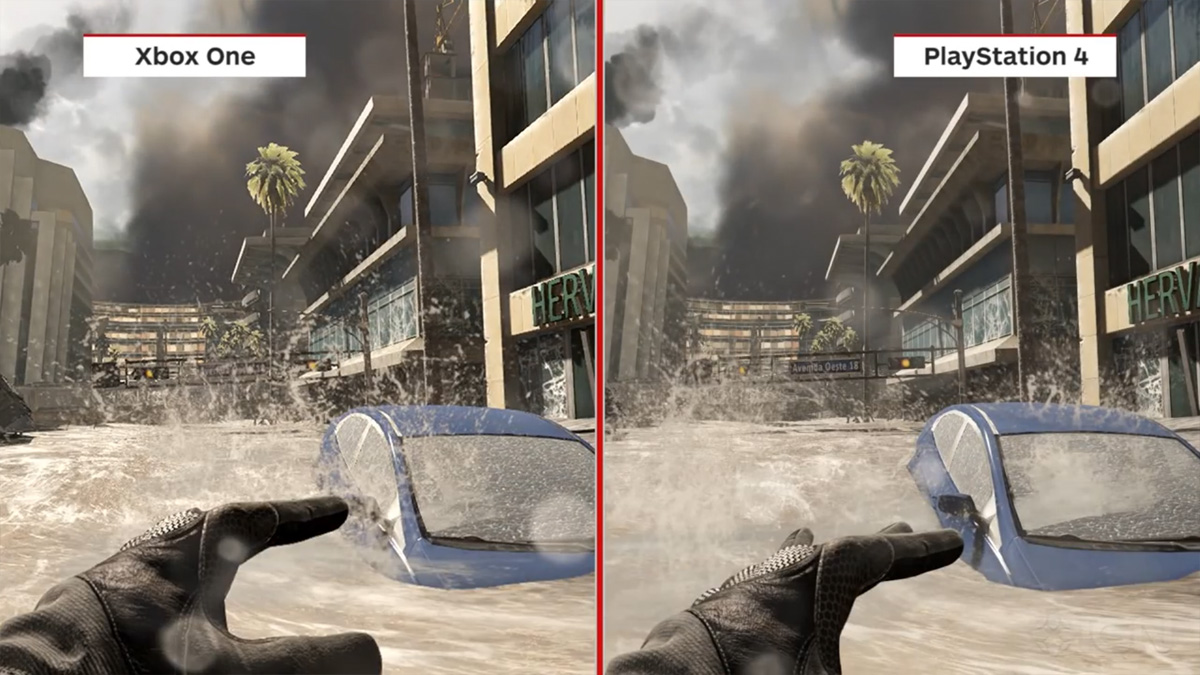

As what I have noticed, although there's more detail in the Xbox One shot, however the PS4 details are actually obscured by an environmental dust effect. ( Like the Call of Duty screenshot above) PS4 footage is also a lot higher-contrast, which is seen consistently is graphics comparison.
Here's a graphic comparison video from Call of Duty; Ghosts^
Xbox One vs PS4 - Controllers
Which has the better gamepad?. The DualShock 4 from PS4 or the Xbox One pad?. I think both controllers are the best.
Xbox One pad

DualShock 4

Both controllers have the genetic material of their forebears, but the DualShock 4 feels like more of a change. Microsoft has stuck with what worked so well in the Xbox 360 controller with the Xbox One pad, and such it's more of a tweak than a full ground-up design.
DualShock 4's changes are more marked. Its a bit bigger than previous DualShock controllers, and a lot heavier too, giving a firmer feel than the last-gen DualShock 3 pad. While the Xbox One pad has rumble motors built into the triggers give you feedback when, for example, shooting guns. Microsoft also had also made the biggest improvement to the D-pad.
Now, have you ever think of what is the best gaming console for you?. Have you ever declare a victor between the Xbox One and PS4?. I'll let you decide for that.
Credits to Andrew Willams and Trusted reviews for the Images and some information. All rights reserved.
Playstation 4 is still proving to be the people's most favourite gaming console, with stock shortage still a regular occurance. But Microsoft is fighting back, with their Kinect-free Xbox One and an entourage of incoming game hardware bundles. Overall, the Xbox One is a more rounded entertaiment system, but it's all down to your personal preferences. The decision is far from clear cut. Here I present some compared aspect of the console duo.
Xbox One vs PS4 - Design
Xbox One - 10 percent larger than Xbox 360, " Big Box Design", weigh 3.18 kg
 |
| XB1 |
PS4 - Slanted design, weighs 2.8 kg
 |
| PS4 |
Why there is an extra size in the Xbox One?. It's likely that part of the internal volume of the Xbox One's cas is there to aid cooling. PS4 have the smaller and less space consuming in our living rooms, but the Xbox One may end up being reliable in the long term, thanks to its extra cooling.
Now I'll show to you what are the interfaces of the Xbox One and PS4.
Xbox One
 |
| Xbox One's User Interface (UI) |
The interface of the Xbox One software is heavily inspired by the elements of Windows Phone and Windows 8. Microsoft clearly wanted to reach a certain level of parity between of its platforms. It has a modern look. Some critics have criticised the software for its glitchiness and bouts of odd behaviour.
Playstation 4
 |
| PS4's User Interface (UI) |
While the Xbox One has the interface which looks like Windows 8 and Phone. The PS4 has a simpler, somehow less ambitious user interface. As it leaves you scrolling in just one direction most of the time, we find it more intuitive expericence than the Xbox One's software.
Xbox One vs PS4 - CPU
Xbox One - AMD 8-core Jaguar CPU
PS4 - AMD 8-core Jaguar CPU
Both Xbox One and PS4 use extremely similar CPU's made by AMD. Both use an APU setup, which links together both CPU and GPU into one package. The CPUs are 8-core chips using 'Jaguar' cores - a term picked by their maker AMD to denote their chipset generation. Xbox One runs at 1.75GHz, which waas bumped-up from their original spec of 1.6GHz. Sony's runs slightly cooler at 1.6Ghz, which may make some of you think the Xbox One is more powerful.
GPU and RAM
Xbox One - Comparable to Radeon HD 7000-series, 8GB DDR3 RAM and 32MB eSRAM
PS4 - Comparable to Radeon HD 7000-series, 8GB GDDR5 RAM
The Xbox One and PS4 both use and AMD GPU. It seems like their GPUs may be identical, but they are really not. On paper the PS4 Graphics processor is 50 percent more powerful, with 1,152 shader processors against the Xbox One's 768
Xbox One vs PS4 - Graphics
One of the main reason core gamers chosen to favour the PS4 over the Xbox One is its categorically better graphics hardware. With many games, the PS4 renders at a slightly higher resolution than the Xbox One.
Comparison ;
 |
| (c) Andrew WIlliams - Trusted Reviews |
Here are some screenshots I have seen.
 |
As what I have noticed, although there's more detail in the Xbox One shot, however the PS4 details are actually obscured by an environmental dust effect. ( Like the Call of Duty screenshot above) PS4 footage is also a lot higher-contrast, which is seen consistently is graphics comparison.
Here's a graphic comparison video from Call of Duty; Ghosts^
Xbox One vs PS4 - Controllers
Which has the better gamepad?. The DualShock 4 from PS4 or the Xbox One pad?. I think both controllers are the best.
Xbox One pad
DualShock 4
Both controllers have the genetic material of their forebears, but the DualShock 4 feels like more of a change. Microsoft has stuck with what worked so well in the Xbox 360 controller with the Xbox One pad, and such it's more of a tweak than a full ground-up design.
DualShock 4's changes are more marked. Its a bit bigger than previous DualShock controllers, and a lot heavier too, giving a firmer feel than the last-gen DualShock 3 pad. While the Xbox One pad has rumble motors built into the triggers give you feedback when, for example, shooting guns. Microsoft also had also made the biggest improvement to the D-pad.
Now, have you ever think of what is the best gaming console for you?. Have you ever declare a victor between the Xbox One and PS4?. I'll let you decide for that.
Credits to Andrew Willams and Trusted reviews for the Images and some information. All rights reserved.


